-
Shop
- Adidas
- Advanced Technologies
- AI Career Advantage Collection
- AI Skills for Creators & Freelancers
- AI Client Management
- AI Ethics
- AI Mindset
- AI Tools & Prompts
- AI Writing & Content Creation
- Audio, Voice & Music
- Design & Visual Creation
- Email, Messaging & Communication
- Freelancing & Business
- Marketing, Ads & Conversion
- Productivity, Workflow & Automation
- SEO & Search Optimization
- Social Media Content & Growth
- Strategy, Planning & Analytics
- Video Creation & Editing
- AI Skills Mastery 2026 Collection
- Bathroom
- Best-Sellers
- Car Accessories
- Confidence
- Dating & Social Skills
- Digital Resources
- AI & Technology
- AI Skills
- Beauty
- Budgeting & Saving
- Car Buying & Ownership
- Cozy Feast Collection
- Electronics & Technology
- Entrepreneurship & Business Growth
- Financial Education
- Financial Independence
- Financial Mindset & Psychology
- Goal Setting
- Hobbies
- Home Styling & Organization
- Kitchen & Recipes
- Leadership
- Mindfulness
- Mindset
- Online Business
- Parenting & Child Development
- Personal Style & Fashion
- Pet Lifestyle & Wellness
- Positive Thinking
- Sleep Improvement
- Smart Life with AI
- Stress Management & Relaxation
- Travel Planning
- Wellness
- Yoga & Fitness
- Yoga & Mind-Body Practices
- Education & Learning
- Family & Parenting
- Fashion
- Furniture
- Gadgets
- Health & Beauty
- Health & Wellness
- Home & Garden
- Home Decor
- Home Electronics
- Kids & Babies
- Kitchen
- Kitchen Best-Sellers
- Lighting
- Luxury Brands Collection
- Nike
- Patio, Lawn & Garden
- Personal Growth
- Pet Care
- Pet Supplies
- Pets
- Smart Amazon Shopping
- Sport & Outdoors
- Stress Relief & Relaxation
- Travel
- Travel & Adventure
- Wealth
- Popular
- Best deals
Budget HiFi Wired Earphones with Mic: Sound & Calls

HiFi Wired Earphones with Mic: Clear Sound and Simple Calls on a Budget
Wired earphones remain a reliable pick for everyday listening and phone calls: no pairing, no charging, and consistent audio. If you want something straightforward for commuting, online classes, or a spare set to keep in a bag, HiFi wired earphones with an inline mic cover the basics without the hassle of Bluetooth dropouts or battery anxiety. Below is what to expect from a budget-friendly wired pair, how to get the best sound and call quality, and what to check to make sure they work smoothly with your devices. For more guidance, see SIVGA M260 | Headphone Reviews and Discussion.
What You Get and Who They’re For
Budget wired earphones with a microphone are designed for convenience first: plug in, press play, take a call, and get back to your day. They’re a practical fit for listeners who prioritize simplicity and predictable performance over extra features. For further reading, see Wired USB-C Earbuds – HiFi Stereo Sound With Digital ….
- Designed for daily listening, commuting, online classes, and quick phone calls
- Inline microphone and controls (when supported by the device) for hands-free use
- Wired connection for stable sound without Bluetooth dropouts or battery limits
- Best fit for users who want an inexpensive backup pair or a simple primary option
Sound Performance: What “HiFi” Can Mean in Practice
On budget wired earphones, “HiFi” usually points to a clean, consistent signal path rather than a guarantee of studio accuracy. In practice, wired audio can feel more immediate than wireless because it avoids compression settings, connection instability, and latency that some Bluetooth setups introduce.
- Wired audio can deliver consistent volume and low latency compared with many wireless options
- Perceived clarity depends on ear tip seal and how well the earphones sit in the ear
- Good everyday tuning typically balances vocals (mids) with controlled bass for pop, podcasts, and video
- To improve detail and reduce harshness: lower the volume slightly and use a gentle EQ rather than boosting aggressively
Quick EQ tweaks by content type
| Listening type | Try adjusting | Goal |
|---|---|---|
| Podcasts/lectures | Slightly reduce bass, slightly boost mids | Clearer speech and less rumble |
| Pop/hip-hop | Small bass boost, keep treble moderate | Fuller low-end without sharpness |
| Gaming/videos | Small treble boost, moderate bass | Footsteps/dialogue easier to hear |
| Classical/acoustic | Keep EQ mostly flat, minimal boosts | Natural timbre and separation |
Fit is the hidden “spec” that changes everything. A good seal typically boosts bass, tightens the low end, and makes vocals easier to follow at lower volumes. If you’re constantly turning the volume up in noisy places, it’s often a fit issue rather than a power issue.
Microphone and Call Quality
An inline mic is convenient, but it’s also sensitive to how you wear the cable. Small changes—where the mic sits, what it rubs against, and your playback volume—can noticeably change call clarity.
- Inline mic placement matters: keep the mic on the cable facing outward and away from clothing
- For clearer calls, speak slightly across the mic rather than directly into it to reduce plosives
- Wind and cable rub can be reduced by routing the cable under a jacket or using a small clip
- If callers hear echo, lower playback volume to reduce sound leaking back into the mic
If you take calls on the move, consider pausing audio when speaking in very loud areas (busy streets, transit platforms). Even a good mic can only do so much when background noise is close to your voice level.
Comfort, Fit, and Passive Noise Reduction
Wired in-ears rely on passive isolation—basically how well the ear tips seal—rather than active noise canceling. When the seal is right, outside noise softens and music feels fuller without needing extreme volume.
Device Compatibility and Controls
For a quick reference on connector standards, this overview of TRRS vs TRS connectors from SoundGuys is a helpful starting point. If you’re using Apple adapters, Apple’s documentation for the USB‑C to 3.5 mm adapter can clarify what your hardware supports.
Common connection scenarios
| Device | What you may need | Notes |
|---|---|---|
| Phone with 3.5 mm jack | No adapter | Mic/controls typically work if jack supports headset standard |
| USB-C phone without jack | USB-C to 3.5 mm adapter with mic support | Some adapters are audio-only; verify mic compatibility |
| iPhone without jack | Lightning to 3.5 mm adapter | Use an adapter that supports headset mic |
| Laptop/PC (single combo jack) | No adapter | Choose headset as input/output if not automatic |
| Desktop with separate mic/headphone jacks | TRRS-to-dual TRS splitter | Needed to use mic and audio together |
Care Tips to Make Wired Earphones Last
Value Check: When a Budget Wired Pair Makes Sense
In-Stock Picks
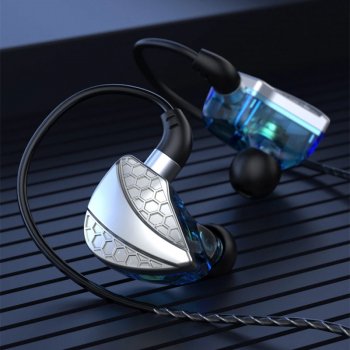
- HiFi Wired Earphones with Mic — a straightforward wired pair for listening and hands-free calls at a budget-friendly price.
- Adidas Men’s Green Suede Sneakers — a comfortable add-on for commuting and campus days when you’re on your feet and on the move.
FAQ
Will the microphone work with my phone?
Yes if your phone has a compatible headset jack or you use an adapter that supports microphone input (some adapters output audio only). If audio works but the mic doesn’t, try a different adapter or check the phone’s input device settings.
Why do the inline buttons not work on some devices?
Button signaling can vary by device and headset wiring standard. Audio may still work normally even if play/pause or volume controls don’t respond.
One ear sounds quieter—what should be checked first?
Reseat the earphone for a better seal, check for debris in the ear tip/mesh, and test with another device. Also confirm the plug is fully inserted, since a partial connection can reduce one channel.













Leave a comment